How to Keep Every Service Record With the AutoDex Logbook
Quick Stats, one-tap entries, receipt scanning, imports and exports: here's how the AutoDex Logbook keeps every service record organized and easy to share.
By AutoDex Team, Newsroom · 2026-10-12
Most drivers can tell you roughly when they last changed the oil. Fewer can say which shop did the brakes, what the invoice listed, or how many miles were on the odometer at the time. That gap matters more than it seems. Service records are the working memory of a vehicle, and the AutoDex Logbook is built to keep that memory complete, organized, and easy to share.
Why service records matter
Keeping records is not busywork. A clear, dated history supports four practical goals.
- Staying on schedule. Your owner's manual sets the maintenance intervals for your specific vehicle. The Car Care Council publishes general service guidelines but tells owners to always check the owner's manual for the manufacturer's recommendations. A log shows what was done and when, so the next interval is easy to spot.
- Protecting your warranty. You don't have to use the dealer for routine maintenance to keep your warranty in effect. The Federal Trade Commission explains that it's illegal for a dealer to deny coverage just because someone else did the work, a protection rooted in the Magnuson-Moss Warranty Act. The FTC also advises keeping all service records and receipts, no matter who does the work, to prove the vehicle was properly maintained.
- Tracking recalls. NHTSA lets you search by VIN for unrepaired safety recalls and recommends checking twice a year. Its lookup does not show recalls that were already repaired, so your own record of completed recall work fills that gap.
- Helping technicians diagnose. The ASE certification study guide lists researching vehicle service history as part of engine and transmission diagnosis. A technician who can see recent work can rule out causes faster and avoid repeating tests.
What every record should include
Florida's Department of Financial Services recommends receipts that are clearly dated and accurately describe the parts supplied and the service performed. A useful record captures:
- The service date
- Odometer mileage at the time of service
- The shop or vendor, or a note that you did the work yourself
- The work performed, including parts and fluids
- The cost
- The receipt or invoice itself
- When the next service is due, by date, mileage, or both
Inside the AutoDex Logbook
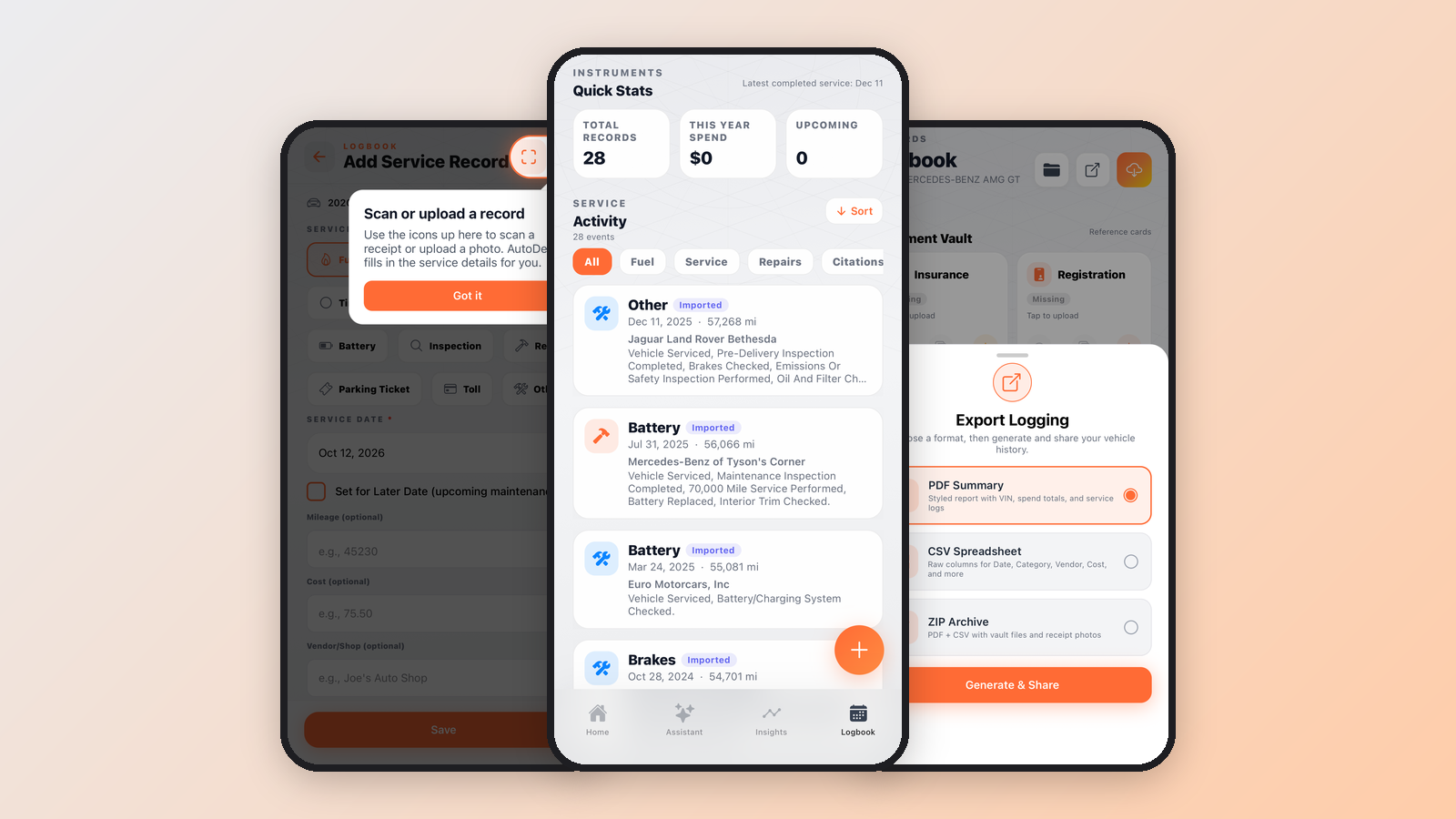
Open the Logbook tab and the Quick Stats panel gives you the headline numbers: Total Records, This Year Spend, Upcoming items, and the date of your latest completed service.
Below that, Service Activity lists every entry with an event count. Filter chips for All, Fuel, Service, Repairs, and Citations narrow the view, and a Sort button reorders it. Each entry shows its category, such as Battery or Brakes, along with the date, mileage, shop name, and a short summary of the notes. Records brought in from another source carry an Imported badge, so you always know where an entry came from.
Adding a record in seconds
Tap the + button and choose a record type: Fuel, Oil Change, Tire Rotation, Brake Service, Battery, Inspection, Repair, Toll, Parking Ticket, or Other.
The Add Service Record form asks for one thing: the service date. Mileage, cost, and vendor or shop are optional, so you can save a quick entry now and fill in details later. To skip typing entirely, use the icons at the top of the form to scan a receipt or upload a photo, and AutoDex fills in the service details for you.
There's also a planning option. Check Set for Later Date to log upcoming maintenance, such as a tire rotation you've already booked. From the Home screen, Quick Capture lets you snap paper, bills, or service receipts the moment you get them, before they disappear into a glovebox.
Bringing your existing history in
Few vehicles start with a blank slate. The Import to Logging sheet offers three ways to catch up:
- Import AutoDex Report pulls records from an AutoDex Vehicle History Report.
- Upload Files & Receipts bulk imports receipts, CSV, XLSX, or JSON files, which is useful if you've kept a spreadsheet for years.
- Email to AutoDex lets you forward vehicle records and receipts to your AutoDex email address.
The Logbook header also holds the Document Vault, with cards for Insurance, Registration, Parking Permit, and Title. Anything not yet added is marked Missing, and a tap starts the upload, so key paperwork lives next to the service history.
Service Details and smarter reminders
Tap any entry to open Service Details. You'll see its status, such as Completed, plus the cost, how long ago the service happened, and a Service Breakdown with the date, mileage, and shop.
The Service Insight section is where a record starts working for you. If no next due target is set, AutoDex prompts you to add one when editing the record. Enter a Next Due Date, a Next Due Mileage, or both, and you get smarter reminders based on your own schedule. Notes and a share button round out the screen.
Sharing records with your shop or fleet
When a technician, insurer, or fleet coordinator needs your history, Export Logging lets you choose a format, then tap Generate & Share:
- PDF Summary: a styled report with the VIN, spend totals, and service logs
- CSV Spreadsheet: raw columns for date, category, vendor, cost, and more
- ZIP Archive: the PDF and CSV together with vault files and receipt photos
For everyday owners, the PDF is the easy one to hand over at a service appointment. Fleet managers can drop the CSV into existing tracking tools to compare maintenance spend across vehicles. Enthusiasts who document every fluid change will appreciate that the ZIP keeps receipt photos alongside the data.
Make it a habit
The best record is the one you log the same day. A few habits help:
- Snap the receipt before you leave the shop.
- Add a next due date or mileage to every routine service.
- Log DIY work too, with the parts and fluids you used.
- Check NHTSA for open recalls twice a year and record any recall repairs.
When something does go wrong, a complete history makes the next conversation with your technician faster and more productive. Pair it with our dashboard warning lights guide and you'll walk into the shop knowing what the car is telling you and what has already been done.
Sources
- Federal Trade Commission: Auto Warranties and Auto Service Contracts
- Federal Trade Commission: FTC Offers Tips on Making the Most of Your Auto Warranty
- Federal Trade Commission: FTC Says Companies' Warranty Restrictions Were Illegal
- NHTSA: Check for Recalls
- ASE: Automobile Tests Study Guide
- Florida Department of Financial Services: Magnuson-Moss Warranty Act
- Car Care Council
Tags: car maintenance, service records, vehicle history report, recalls, car diagnostics
Continue on the desk
- AutoDex Vehicle History Report: What's Inside and How to Use It
- Dashboard Warning Lights: What Each Color Means and What to Do
AI car diagnostics · Vehicle history and VIN lookup · Digital Maintenance Vault · Car expense and cost tracker · Plans and pricing