AutoDex Vehicle History Report: What's Inside and How to Use It
Ownership, accidents, service, recalls and warranties in one shareable file, for $19.99 or two reports with Pro. Here's what's inside and how to read it.
By AutoDex Team, Newsroom · 2026-10-12
A used car's past is usually scattered. A dealer printout here, an inspection sticker there, and a seller's memory of "a small fender bender a few years back." The AutoDex Vehicle History Report pulls those pieces into one document. AutoDex calls it "the report buyers, shops, and you can trust."
Here is what's inside, how to read it, and where it stops being enough.
What the report covers
According to AutoDex, the report covers:
- Ownership history
- Accidents and damage, including structural damage, airbag deployment and total loss
- Mileage history
- Recent service history and inspection records
- Warranties
- Maintenance schedules
- Vehicle market value, with trade-in and private-party figures
AutoDex says its Pro reports "consolidate safety, service, inspection, ownership, and warranty records" into "the same report you can export and keep with the car."
A walk through a sample report
We looked at a sample AutoDex report generated for a 2017 coupe, and we've left out its VIN and other identifying details. It runs 26 pages, in this order:
- Report summary and vehicle snapshot. A report ID and generation date, then the basics: odometer, body type, drivetrain, fuel type, title status and use.
- At-a-glance counts. Number of owners, last odometer reading, recalls and accident events.
- Major flags. A short list of items worth attention. On the sample: 37 recalls listed, a moderate/severe damage event and four expired warranty lines.
- Recent service history. Each entry shows the date, the shop, the work performed and usually an odometer reading, tagged as Maintenance, Repair or Inspection. The sample lists 37 events, going back to a pre-delivery inspection.
- Inspection records. A timeline with the date, state and source of each inspection.
- Ownership history. Ownership dates, state, status (such as current owner), duration and purchase date.
- Accident and damage. Reported incidents with type and severity. The sample shows one collision rated moderate.
- Warranties. Each coverage line with its months/miles limit and status. All four were expired on the sample.
- Safety and recalls. Each campaign with its date, a risk label, campaign number, manufacturer, summary, consequence and remedy.
- Disclaimer. The report says it is built from "available vehicle records and third-party data sources," that information "may be incomplete or delayed," and that AutoDex recommends independent verification.
Two reading tips from the sample. First, the odometer readings in the service history double as a mileage record. Steady increases make sense. A reading that goes backward, or a long gap, is worth a question.
Second, a big recall number needs context. In the sample, several issues appear twice under different campaign numbers, and the section is labeled "open and historical safety actions." Check the VIN on NHTSA's recall lookup to see what is still unrepaired.
Before and after Vehicle History Sync
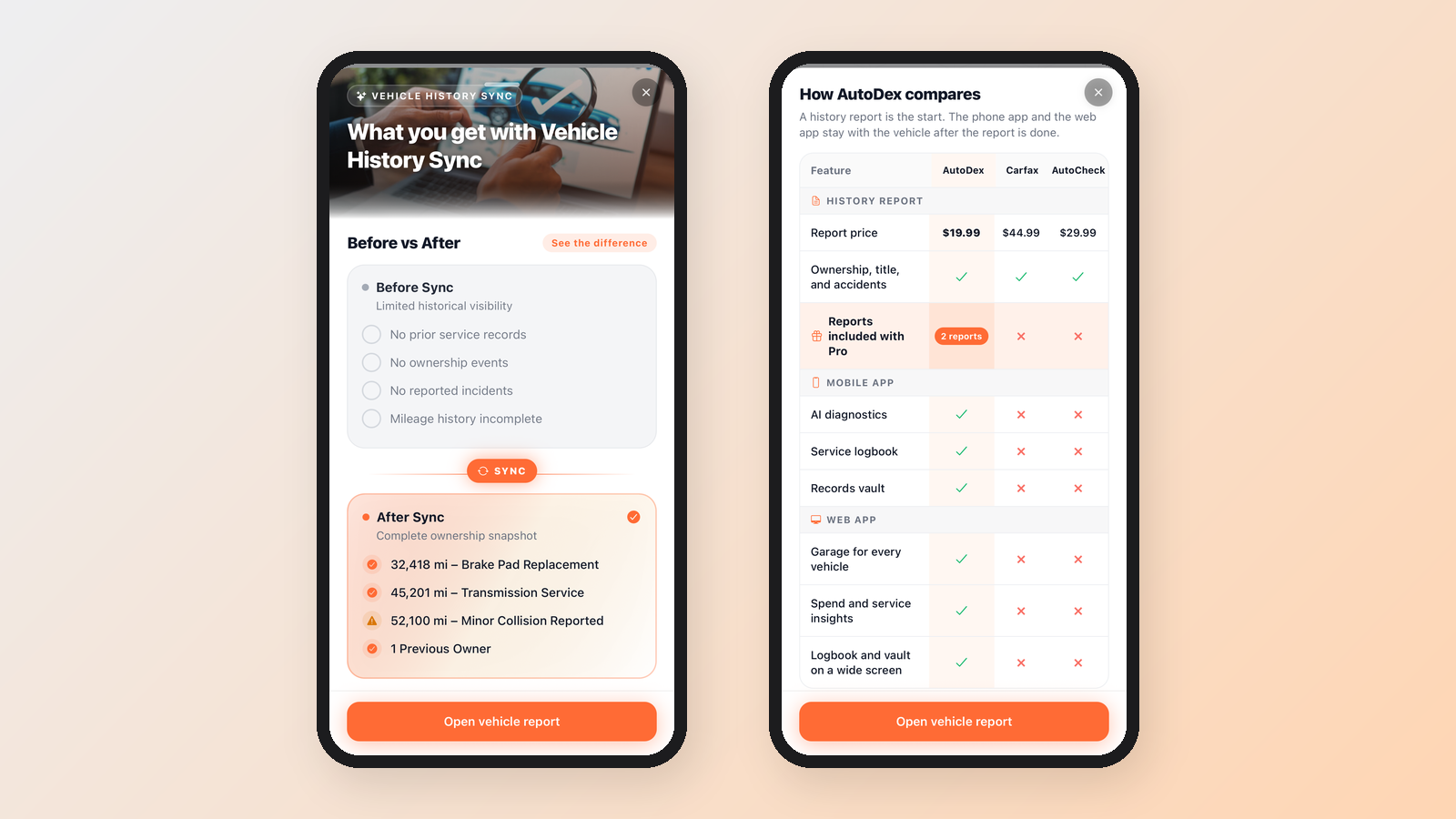
In the app, history comes in through a step called Vehicle History Sync. Its "What you get" screen shows the difference. Before sync, a vehicle has "limited historical visibility": no prior service records, no ownership events, no reported incidents and incomplete mileage history.
After sync, the screen shows a "complete ownership snapshot," with entries like these:
- 32,418 mi – Brake Pad Replacement
- 45,201 mi – Transmission Service
- 52,100 mi – Minor Collision Reported, marked with a warning icon
- 1 Previous Owner
Those are example entries on the app screen, not data from a real vehicle. An "Open vehicle report" button takes you to the full document.
Using it to buy, sell or service a car
The same report is useful on both sides of a sale, and at the shop:
- Buyers. Run it before the test drive and turn it into questions. Does the dash mileage line up with the last reading? What was repaired after the reported collision? Were the recalls done?
- Sellers. AutoDex describes it as "one shareable Vehicle History Report." Sharing it up front, along with the receipts in your Logbook, answers questions before a buyer has to ask.
- Shops. A technician working on an unfamiliar car can see what was replaced, when and at what mileage, plus which warranty lines have expired.
If the car makes a noise you can't place on the test drive, record it. Our guide to AutoDex Sound Diagnostics explains how a recording can help you describe it to a mechanic.
Price and how it compares
AutoDex lists the report at $19.99 one time, or two premium reports with Pro. According to AutoDex's comparison in the app, a report costs $44.99 from Carfax and $29.99 from AutoCheck. All three cover ownership, title and accidents. Prices change, so check each provider before you buy.
The comparison puts AutoDex's main difference after the report. Its table marks AI diagnostics, a service logbook and a records vault in the mobile app as AutoDex features. On the web app, it adds a garage for every vehicle, spend and service insights, and the logbook and vault on a wide screen. In AutoDex's words: "A history report is the start. The phone app and the web app stay with the vehicle after the report is done."
The app also offers recall alerts for your VIN. On privacy, AutoDex says: "We do not sell your vehicle history."
Why history matters when you buy used
A history report helps you ask better questions before money changes hands. Here is what to look for and where to check it:
- Title brands. A brand is a label a state puts on a vehicle to flag its current or past condition, such as "junk," "salvage" or "flood," according to the Department of Justice's National Motor Vehicle Title Information System (NMVTIS). Consumers can check a vehicle's title, most recent odometer reading and brand history through approved data providers.
- Odometer readings. Compare the mileage history in a report with what the dash shows.
- Accidents and damage. Look for structural damage, airbag deployment and total-loss records.
- Open recalls. NHTSA's free lookup shows unrepaired safety recalls on a specific vehicle by its 17-character VIN. It covers recalls from the past 15 years, and very new recalls may not show up right away.
A report is not an inspection
Even a clean report has limits. The Federal Trade Commission puts it bluntly: "A vehicle history report is not a substitute for an independent vehicle inspection." Reports may list accidents and flood damage but typically won't list mechanical problems.
Before you buy, pay an independent mechanic for a pre-purchase inspection, even on a car the dealer calls "certified." Bring the report along. It tells the mechanic where to look first.
Sources
- AutoDex homepage, features and FAQ
- AutoDex Newsroom: AutoDex Sound Diagnostics and car noises
- U.S. Department of Justice, NMVTIS: For Consumers
- U.S. Department of Justice, NMVTIS: Approved Data Providers
- NHTSA: Check for Recalls
- Federal Trade Commission: Buying a Used Car From a Dealer
Tags: vehicle history report, used cars, car maintenance, recalls
Continue on the desk
- AutoDex Sound Diagnostics: Record a Car Noise, Get a Read
- Check Engine Light: What Steady vs. Flashing Means and What to Do
AI car diagnostics · Vehicle history and VIN lookup · Digital Maintenance Vault · Car expense and cost tracker · Plans and pricing