AutoDex Sound Diagnostics: Record a Car Noise, Get a Read
A new car noise is hard to describe. AutoDex Sound Diagnostics, now in beta, records it and returns a finding with next steps. Here's how it works.
By AutoDex Team, Newsroom · 2026-10-12
Cars usually warn you before something fails. A new squeal at a stoplight. A click in a tight turn. The hard part is explaining it. "Kind of a whirring thing" doesn't give a service writer much to work with.
AutoDex Sound Diagnostics, now in beta, is built for that moment. You record the noise, tell the app where it's coming from and what the car is doing, and get a plain-language finding with next steps. It fits the app's tagline: "Know your vehicle. No guessing."
Why a new noise deserves attention
Consumer Reports advises treating an unusual whine, creak or squeal as "an alert that something has changed." Paying attention early can mean catching a minor problem before it becomes a major one.
Some sounds come up again and again:
- High-pitched squeal when braking. Often dirt between the pads and rotors, or the wear indicators built into the pads. AAA Club Alliance says it is usually not an emergency, but it shouldn't be ignored.
- Grinding when braking. Consumer Reports says this can mean the pads have worn through and the car is unsafe to drive. Its advice: stop driving and have the car towed.
- Clicking or popping in turns. On front- or all-wheel-drive vehicles, AAA notes this can point to worn CV joints.
- Humming or whining. It can be a worn belt or an early sign of transmission trouble, according to AAA.
- Clunking, tapping or banging from a running engine. AAA's advice is to shut the engine off and get the vehicle to a mechanic.
Where to find Sound Diagnostics
On the AutoDex Home screen, Sound Diagnostics appears under Quick Actions as "Record an engine, belt, or brake noise for instant AI analysis." Nearby is "Is this urgent?", for checking whether something needs immediate attention.
The feature itself lives in the Assistant tab, part of AutoDex's broader diagnostics. In the AutoDex site's words: "Describe a symptom, decode a light, or record a noise. AutoDex walks you through urgency, next steps, and cost."
How to use it
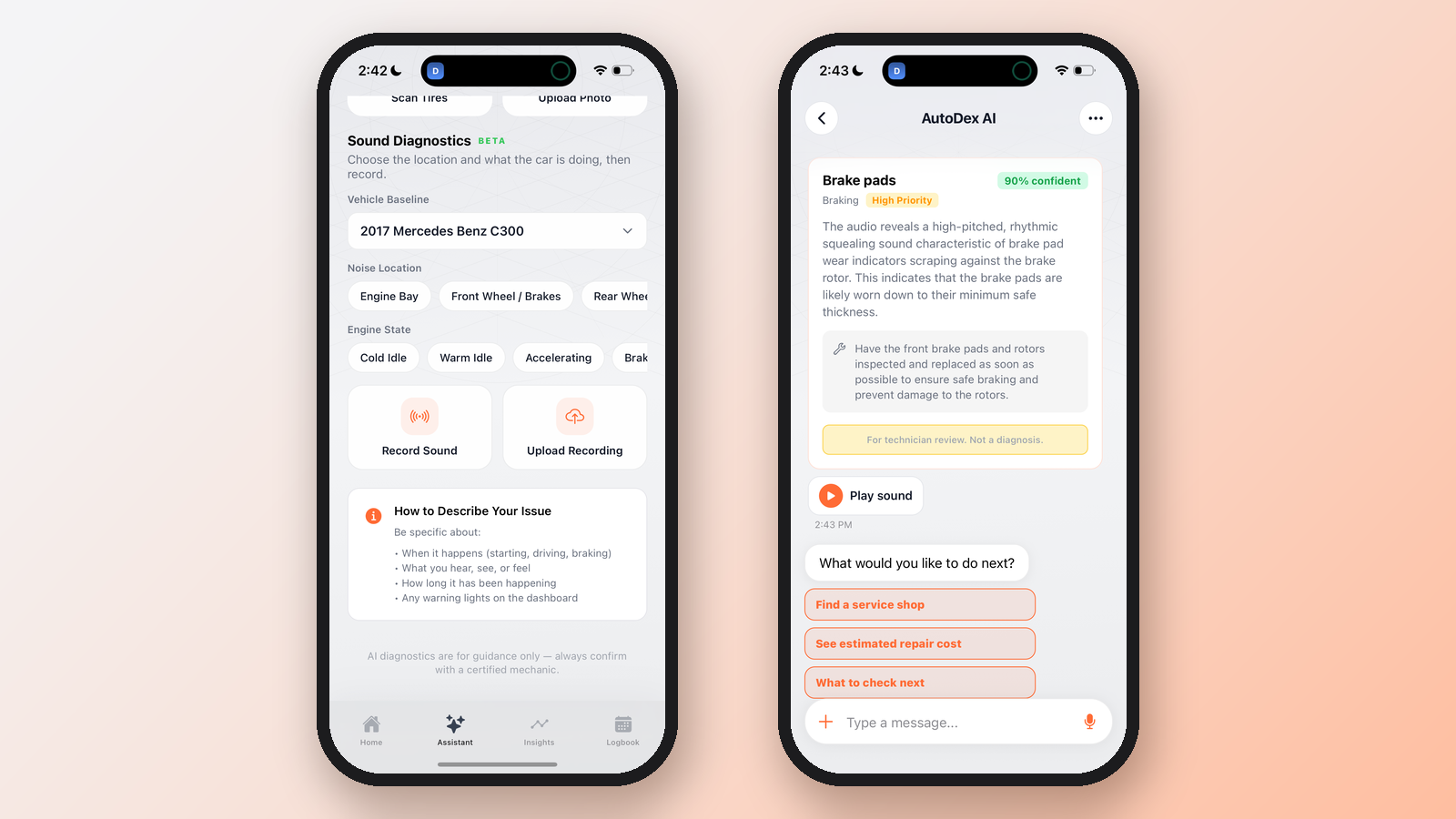
The screen's instruction is short: "Choose the location and what the car is doing, then record." Here's the flow:
- Confirm your vehicle. The Vehicle Baseline field shows the car you're checking, for example a 2017 Mercedes Benz C300.
- Pick the noise location. Choose from options such as Engine Bay, Front Wheel / Brakes and Rear Wheel.
- Pick the engine state. Tell the app what the car is doing when the sound happens, such as Cold Idle, Warm Idle, Accelerating or Braking.
- Record or upload. Tap Record Sound to capture the noise live, or Upload Recording if you already have a clip. Only record when it's safe. If the noise happens on the road, have a passenger hold the phone.
- Wait a moment. The AutoDex AI screen shows "Listening to the recording," then "Preparing your finding." The app notes this usually takes a few seconds.
- Read the finding and choose a next step.
A tip box, "How to Describe Your Issue," says to be specific about when the noise happens (starting, driving or braking), what you hear, see or feel, how long it has been going on, and any dashboard warning lights.
What a finding looks like
Here's an example finding shown in the app. The result card is titled "Brake pads," filed under Braking, tagged High Priority and marked "90% confident." It reads:
"The audio reveals a high-pitched, rhythmic squealing sound characteristic of brake pad wear indicators scraping against the brake rotor. This indicates that the brake pads are likely worn down to their minimum safe thickness."
The recommendation: "Have the front brake pads and rotors inspected and replaced as soon as possible to ensure safe braking and prevent damage to the rotors."
That matches AAA's description of a braking squeal from the pads' wear indicators. The confidence figure belongs to this one result. It isn't a promise that every recording will be read the same way.
A Play sound button replays your clip. Below the card, the app asks, "What would you like to do next?" and offers three paths:
- Find a service shop
- See estimated repair cost
- What to check next
You can also type a follow-up question in the chat box. The App Store listing says the AI helps you explore potential causes and know what questions to ask a mechanic. You can try diagnostics on the free plan. Pro adds unlimited AI diagnostics.
A guide, not a verdict
AutoDex is direct about the limits. The result card carries the label "For technician review. Not a diagnosis." The setup screen's footer says, "AI diagnostics are for guidance only — always confirm with a certified mechanic." The AutoDex site adds that its guidance "is based on your vehicle and is not a substitute for a licensed mechanic."
A sound clip can't see a torn CV boot or measure how much brake pad is left. A recording helps you decide how quickly to act and what to tell the shop. It doesn't replace the shop.
When to see a mechanic
Book an inspection for any new noise that persists, even if the finding sounds minor. Don't wait if you notice:
- Grinding when you brake. Consumer Reports says this can mean the pads are worn through. Stop driving and have the car towed.
- A soft or spongy brake pedal. See AAA's brake warning signs.
- Knocking, clunking or banging from the engine. Shut it off and get it to a mechanic, per AAA.
- A flashing check engine light. As our guide explains, the EPA says blinking signals a severe problem.
- A High Priority result in the app, or any noise paired with a new warning light.
Bring the recording with you. Play sound lets the technician hear exactly what you heard, even if the car stays quiet in the shop.
Sources
- AutoDex homepage, features and FAQ
- AutoDex on the App Store
- AutoDex on Google Play
- Consumer Reports: What Your Car Is Telling You When It Whines, Creaks, or Squeals
- AAA Club Alliance: Vehicle Noises You Should Never Ignore
- AAA: 11 Ways To Know You May Need New Brakes
- AutoDex Newsroom: Check Engine Light: What Steady vs. Flashing Means and What to Do
Tags: sound diagnostics, car noises, car diagnostics, car maintenance, brakes
Continue on the desk
AI car diagnostics · Vehicle history and VIN lookup · Digital Maintenance Vault · Car expense and cost tracker · Plans and pricing